
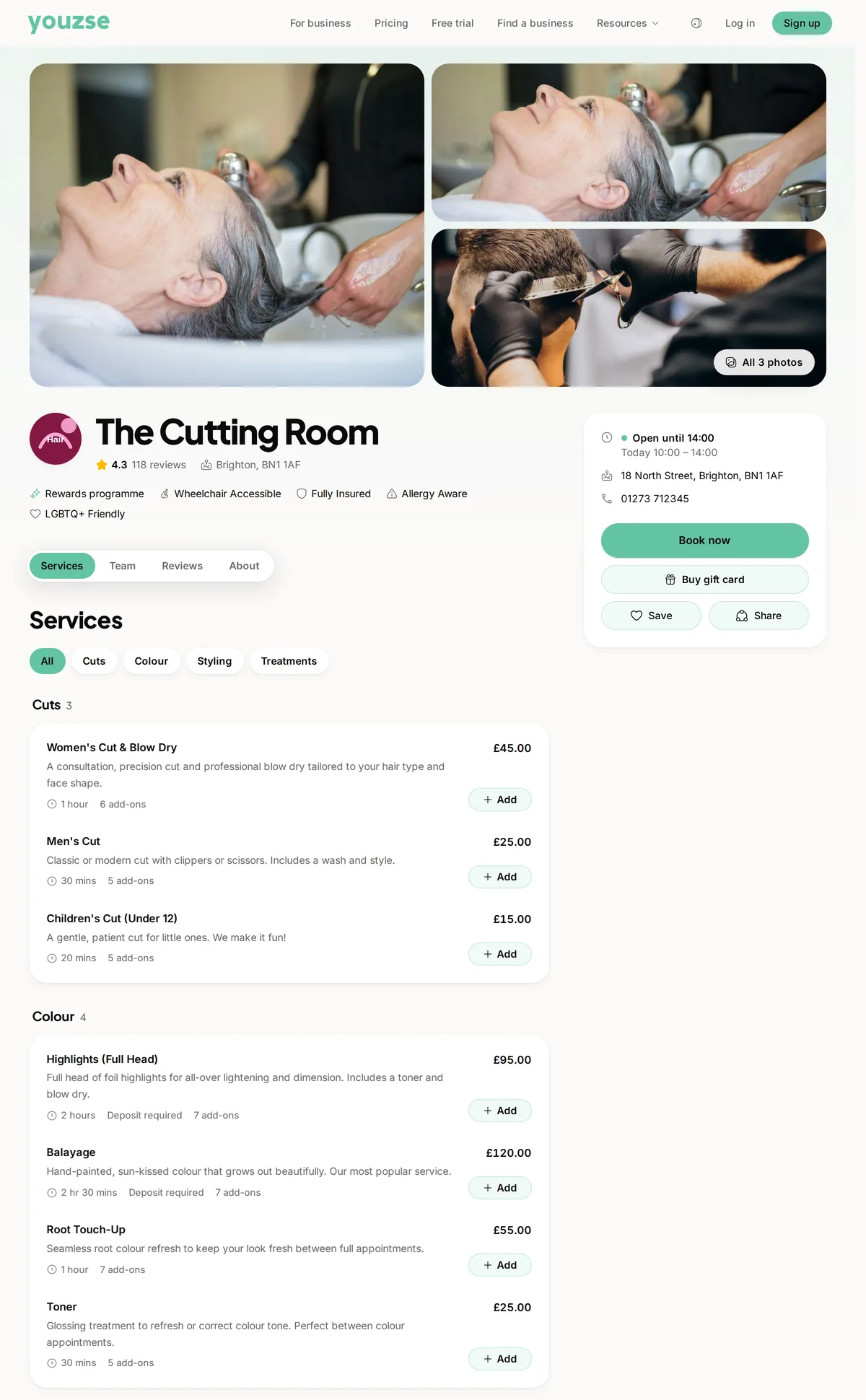
 Book now
The page your customers book on
Photos, rating, opening hours and the whole service menu on one link, with live availability behind the button.
One link your customers book through, with availability worked out from the hours your team actually works and the rules you set for notice, deposits and changes.

Real screens from The Cutting Room, our demo salon, with the numbers it shows today.
Book nowPhotos, rating, opening hours and the whole service menu on one link, with live availability behind the button.
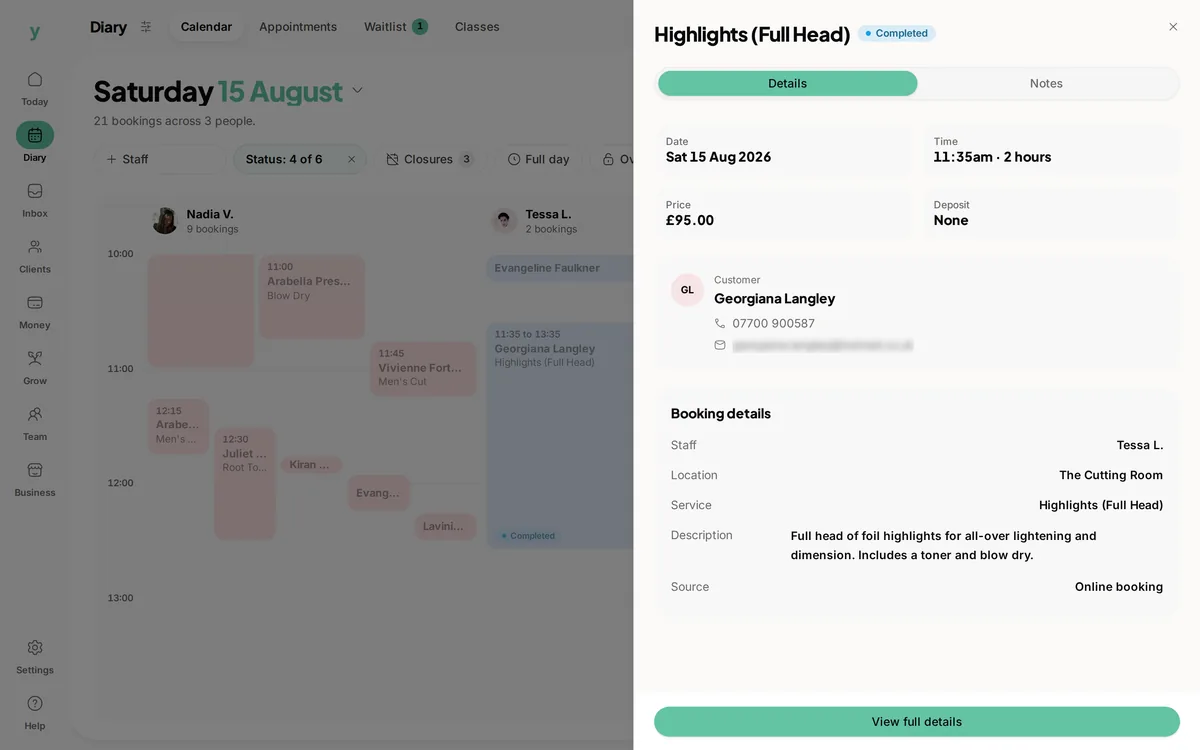 21 bookings across 3 people
Bookings from your page, the phone and the front desk sit together, each with its price, its deposit and where it came from.
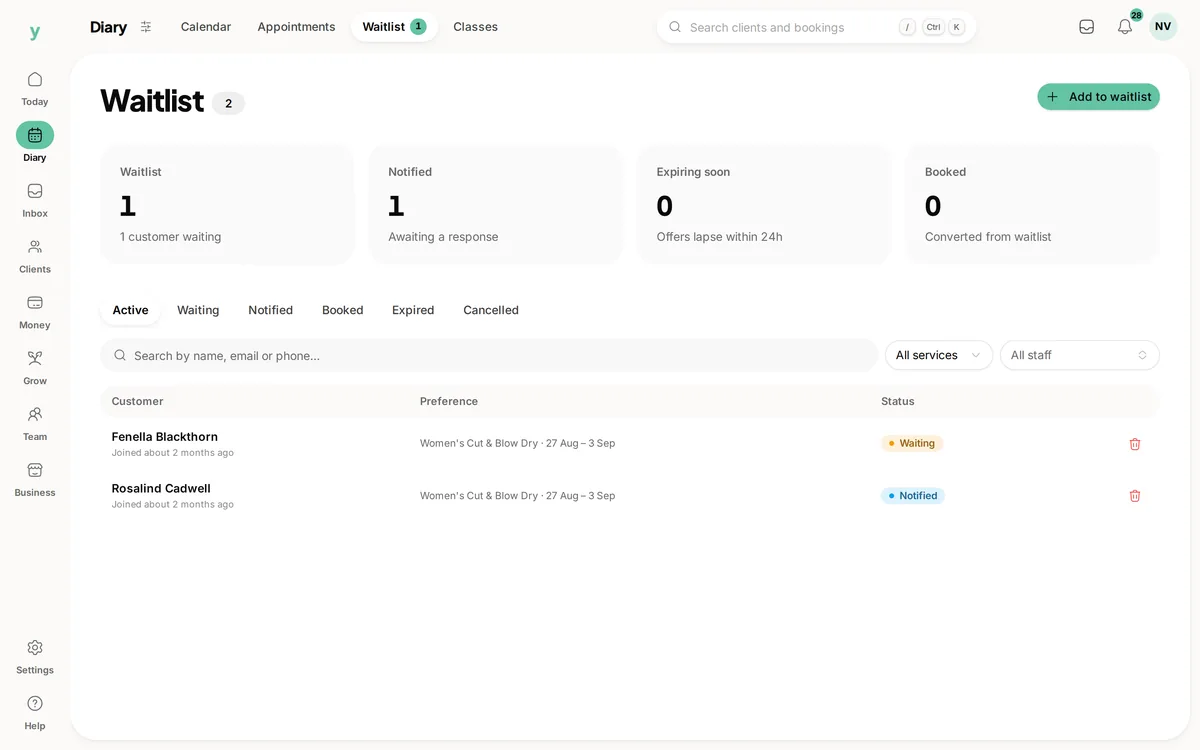 Waiting, notified, booked
A customer who cannot find a slot joins the waitlist from the same page instead of closing the tab.
A booking page is the one part of this software your customers ever see. Everything else can be fixed later. If the page shows a time you cannot work, takes two people for the same slot or asks for something a customer will not give at ten at night, the damage is done before you hear about it. This page is about what the Youzse booking page does, what you can set on it and the two places it will not do what you might assume.
Every business on Youzse gets a page at its own address on youzse.app, built from the business name. That page carries the services, the prices, the opening hours, the team, the photos and the reviews, and it has a Book button on it. There is nothing to install and nothing to embed, so the link works the moment the services and hours are set up: in a bio, in a text message, on a card, on a Google Business Profile.
If you already have a website, the page is a link from it rather than a replacement for it. That is a deliberate limitation worth knowing before you plan a redesign around it: Youzse publishes the booking page, not your site.
The same page is also where customers who find you through Youzse rather than through your own link arrive. That matters for cost rather than for function, and the money section below says why.
Availability is not a list you keep. It is worked out, for each person, each time somebody looks: their weekly working pattern, any override on a particular day, the location they work from, business holidays, the appointments already in the diary and any slot another customer is in the middle of booking.
That is the difference between a diary and a calendar. A calendar shows what is in it. This works out what is left, per person, per service, because a forty minute cut and a ninety minute colour do not leave the same gaps in the same day.
A service can take longer for one member of staff than another, and the times offered follow the person rather than an average. A service that more than one person can do offers whoever is free, so a customer who does not mind who they see is not shown an empty day because their usual stylist is off.
| Setting | What it does | Where it applies |
|---|---|---|
| Minimum notice | How close to the start a customer may still book. An hour stops somebody booking a slot you are already walking to. | Business-wide, or a service of its own |
| How far ahead | The last day the page will offer. Stops somebody booking a Tuesday in eleven months. | Business-wide, or a service of its own |
| Slot interval | Whether times are offered on the quarter hour, the half hour or the hour. | Business-wide, or a service of its own |
| Double booking | Off by default. On, for the kinds of work where two jobs genuinely do overlap. | Business-wide, or a service of its own |
| Blocked dates | Specific dates the page will not offer at all, separately from holidays. | Business-wide, or a service of its own |
| Deposit | A fixed amount or a percentage of the price, taken when the booking is made. | Per service |
| Cancellation window | How many hours before the start a customer may cancel without a fee. | Business-wide, or a service of its own |
| Reschedule rules | Whether a customer may move a booking themselves, how late they may do it and how many times. | Business-wide, or a service of its own |
A rule set on a service wins over the business-wide one, so a free consultation can stay open to last minute bookings while a four hour job needs two days notice.
This is the failure nobody tests for and everybody eventually hits. Two customers open the same Saturday morning, both see eleven o'clock and both start booking.
The slot is held for two minutes while the first one is paying, so the second one stops seeing it. If the first customer abandons the page, the hold expires and the slot comes back. The final check happens again at the moment the booking is written, inside a lock on the slot, so a slow connection or a retry cannot squeeze a second appointment into the same minutes.
The practical result is that the diary stays right without anybody having to ring somebody back and apologise. It is worth testing from two phones during a trial, because it is the single most expensive thing to get wrong and the easiest to miss.
A customer picks a service, picks a person or leaves it open, picks a time, adds anything extra the service offers and confirms. Where the service carries a deposit or a fee, the card step happens here rather than later.
A customer does sign in before the booking is confirmed. State that plainly rather than discover it in a trial: there is no fully anonymous checkout. What softens it is that signing in does not mean inventing a password. They can use a one tap link sent to their email, or Google, or Apple, and a customer who has booked before is usually already signed in. The account is what makes the next part work, so the trade is deliberate rather than accidental.
What they get for it is a booking they can manage themselves. Every confirmation and every reminder carries a link to their own booking, where they can see it, move it or cancel it inside the window you set. That is the difference between a booking page and an enquiry form: the three messages that normally follow a booking never get sent.
Nothing per booking. Youzse takes 0% commission on anything you take, including the customers who find you through Youzse rather than through your own link, which is the fee most marketplace platforms charge and the reason businesses go looking for an alternative.
Where a customer pays by card, standard UK cards are 1.5% plus 20p. All of that is Stripe's own processing rate and Youzse adds nothing to it, so the figure on your statement is the figure here.
Plans start at £19 a month and the trial is 30 days with no card. The booking page, the diary, the customer records and the reminders are on every plan.
The buying questions rather than the mechanics: VAT, UK GDPR and card rates in pounds.
What the card step on the booking page actually takes, and what it costs.
What goes out after the booking, and the link that lets a customer move it.
The same booking page, set up the way a salon diary actually works.
The limits and the detail, answered before you spend an afternoon testing for them.
No. A customer signs in before the booking is confirmed, but signing in does not mean inventing a password: a one tap link sent to their email works, and so do Google and Apple. The account is what lets them see, move and cancel the booking themselves from the link in their confirmation.
We value your privacy
Cookies keep Youzse running, improve the platform and help deliver relevant content. Read our privacy policy and cookie policy.