
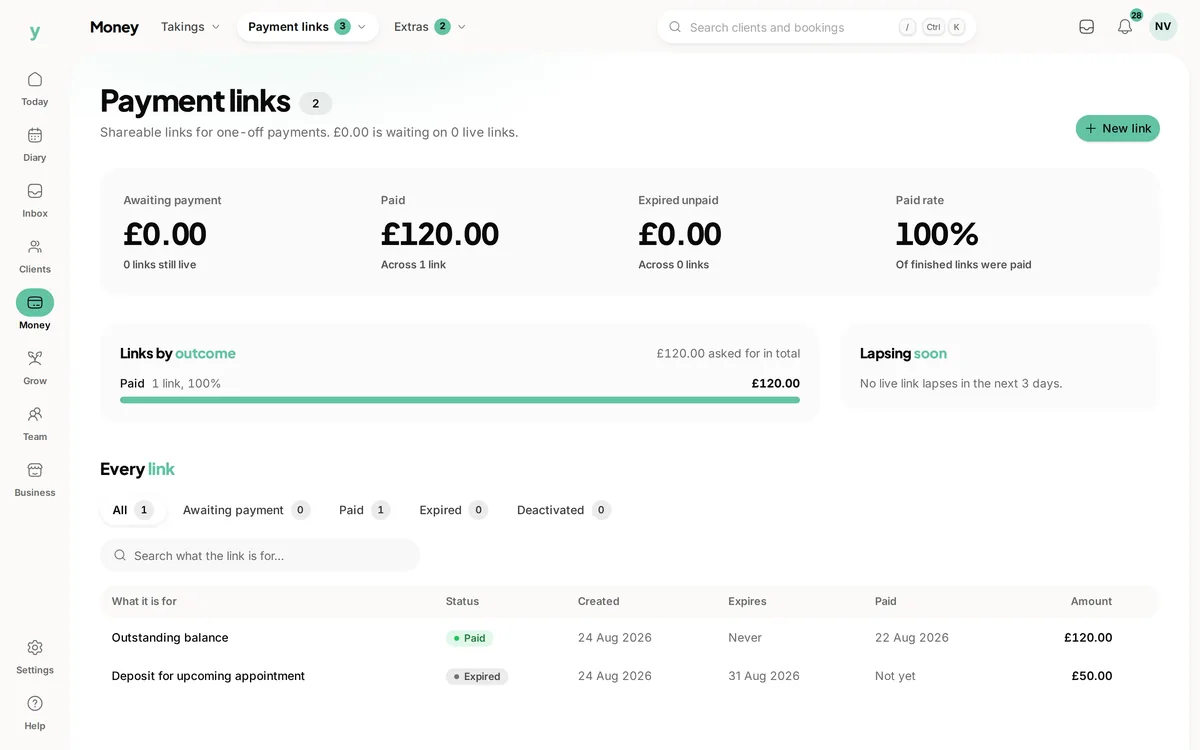
 Separate paid from still awaiting payment
Find the current request
Check the link state before following up with the customer.
Agree the amount, share the link and see when the payment is recorded.
Real screens from The Cutting Room, our demo salon, with the numbers it shows today.
Separate paid from still awaiting paymentCheck the link state before following up with the customer.
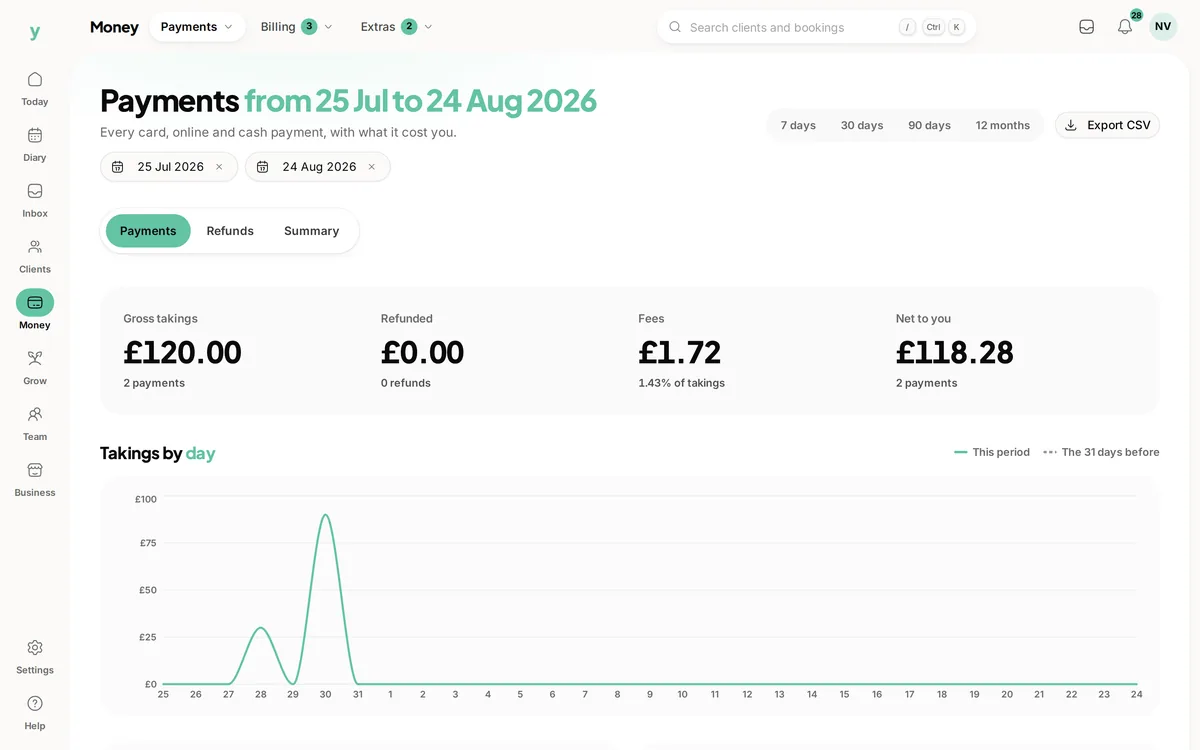 Money received has its own record
Review recorded payments alongside the requests that have been sent.
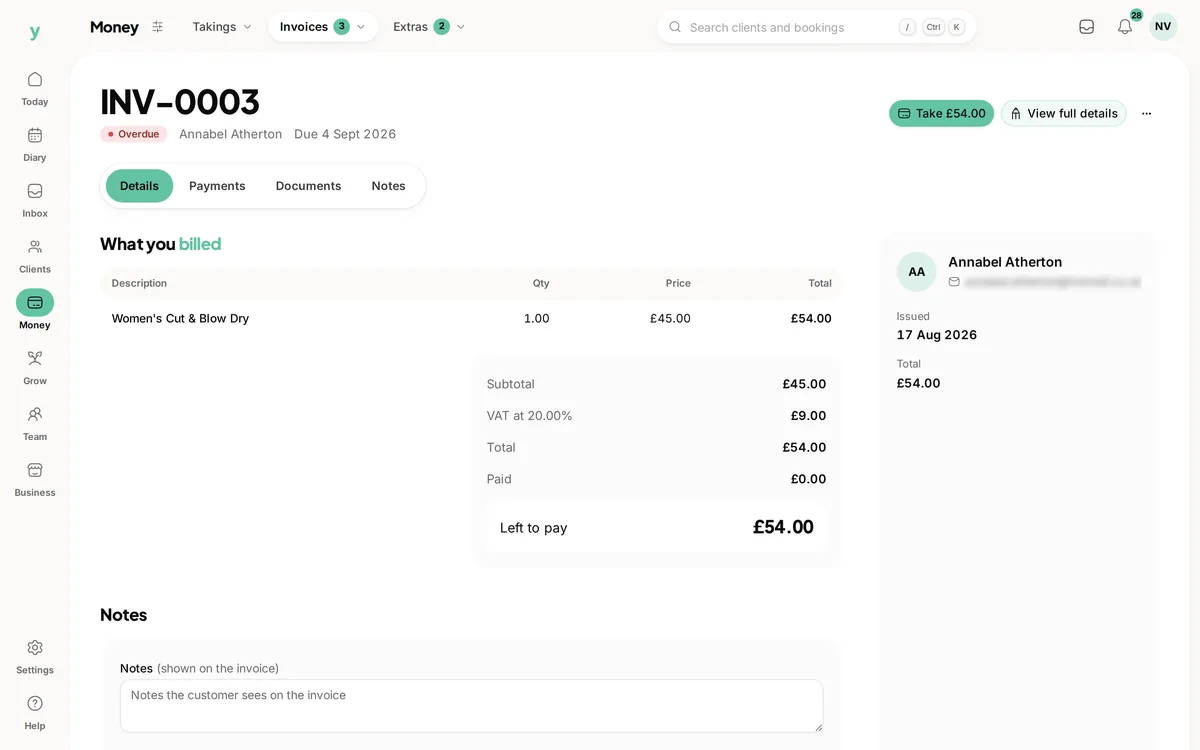 An invoice needs the right payment route
Use the relevant invoice workflow when collecting an outstanding invoice balance.
A customer is ready to pay, but you are not standing together at the till. Youzse payment links give them a page with the amount and a description of what the payment is for. Create the appropriate link, share it through your customer conversation and check its recorded state afterwards. Payment setup and processing still apply, just as they do to other online card payments.
Create the link with the agreed amount and a useful description. Where appropriate, associate it with the customer so the payment has context in the business. A description such as the job reference and agreed stage is more useful than a label that only says payment.
Review the amount before sharing the link. The customer page should reflect the sum you actually agreed, not a rough estimate left over from an earlier conversation. If the amount changes, review the old link and use the supported controls so the customer is not left choosing between two conflicting requests.
A standalone payment link records its own payment. Other payment journeys can link a request to an invoice or appointment. Those connections matter because the payment needs to appear against the right piece of work, not just somewhere in the business totals.
If you are collecting an invoice balance, use the relevant invoice payment route and check the link belongs to that invoice. Do not assume a standalone link automatically settles a bill with the same customer name. The associated record is what makes the balance change in the right place.
| Situation | What to review | What the customer needs |
|---|---|---|
| A standalone agreed payment | The link amount, description and customer association. | A recognisable explanation of the agreed sum. |
| An invoice balance | The invoice payment workflow and its remaining amount. | The bill reference and the amount still due. |
| An appointment deposit | The relevant booking or deposit payment journey. | Clear deposit terms and the appointment it relates to. |
| A changed or cancelled request | Whether the existing link should be deactivated. | One current instruction rather than competing payment requests. |
| A link that expired unpaid | Its state and whether payment is still required. | An updated arrangement agreed with the business. |
Payment links have an expiry, and the creation workflow allows an expiry date. Review that date against the arrangement you have made. A link for a near-term appointment and a link for work agreed further ahead may need different handling.
An active link can be deactivated through the supported control when the request is no longer appropriate. Expiry and deactivation close the payment route; they do not themselves cancel the underlying work or refund an earlier payment. Keep the customer conversation and the related job record up to date as well.
The customer payment page identifies the business and shows the amount, description and current link state. Open a suitable test link to review those details on a phone. The page should make it easy for the customer to recognise who they are paying and why.
Card payments depend on the business payment account being ready. The page also needs a payable link, not one that is already paid, expired or deactivated. Creating the record is one part of the setup; check the end-to-end payment journey before relying on links for customer collections.
The payment-link list supports search and views for active, paid, expired and deactivated links. Use the relevant view before contacting a customer. A paid request should lead you to the payment record, while an expired unpaid request may need a new arrangement rather than another copy of the old link.
The summary information helps you distinguish money received from requests still awaiting payment. Keep those categories separate when reviewing the day. An active link is a request for money, not revenue already received or a guarantee that the customer intends to pay.
A completed payment is recorded in the business payment records. Where the link belongs to an invoice, that connection is used to settle the appropriate invoice amount. Open the related record if you need to explain what changed rather than relying only on the fact that a link now says paid.
If the customer says they have paid but you cannot see the expected result, inspect the link and payment record before sending another request. A customer message, an open browser page and a confirmed payment are different pieces of information. Keep the reply factual while you check the actual state.
A customer agrees an appointment that needs a deposit and wants to pay later that day. Use the supported appointment or deposit payment route, check the amount and terms and share the appropriate link. The customer can review the business page and complete payment from their own device.
Before the visit, check that the payment is recorded against the right appointment or bill. If the booking changes, review the existing request rather than assuming its expiry will deal with every part of the rearrangement. Payment links help with collection; the business still manages the agreement behind the payment.
A payment link is a way to collect money. An invoice describes the bill, and a refund is a separate movement of money after payment. Sending a link does not replace an invoice where your workflow needs one, and switching a link off does not send money back to a customer.
When correcting a collection, check the related invoice or appointment and the payment history. Explain exactly which part has changed. This is particularly useful when a colleague takes over the conversation and needs to understand whether the customer owes a balance, has already paid or is waiting for a separate correction.
Your Youzse subscription and card processing are different costs. Review the current pricing for your business and payment setup rather than assuming every type of card or country has the same processing rate. A payment link is still an online payment route, not a promise of free card processing.
Keep the customer description about the work and amount they agreed. The business can review processing and payment totals in its own records without turning the customer payment page into an explanation of internal billing. A clear request is easier for both sides to recognise and follow.
Keep the bill and remaining amount clear before requesting an invoice payment.
The payment setup and appointment deposit journey behind the request.
Review routine follow ups alongside the actual payment state.
Check subscription options and the applicable payment processing charges.
The limits and the detail, answered before you spend an afternoon testing for them.
No. Standalone links record their own payment. A link must belong to the relevant invoice workflow for that invoice balance to be settled. Check the associated record before sharing a request.
We value your privacy
Cookies keep Youzse running, improve the platform and help deliver relevant content. Read our privacy policy and cookie policy.