
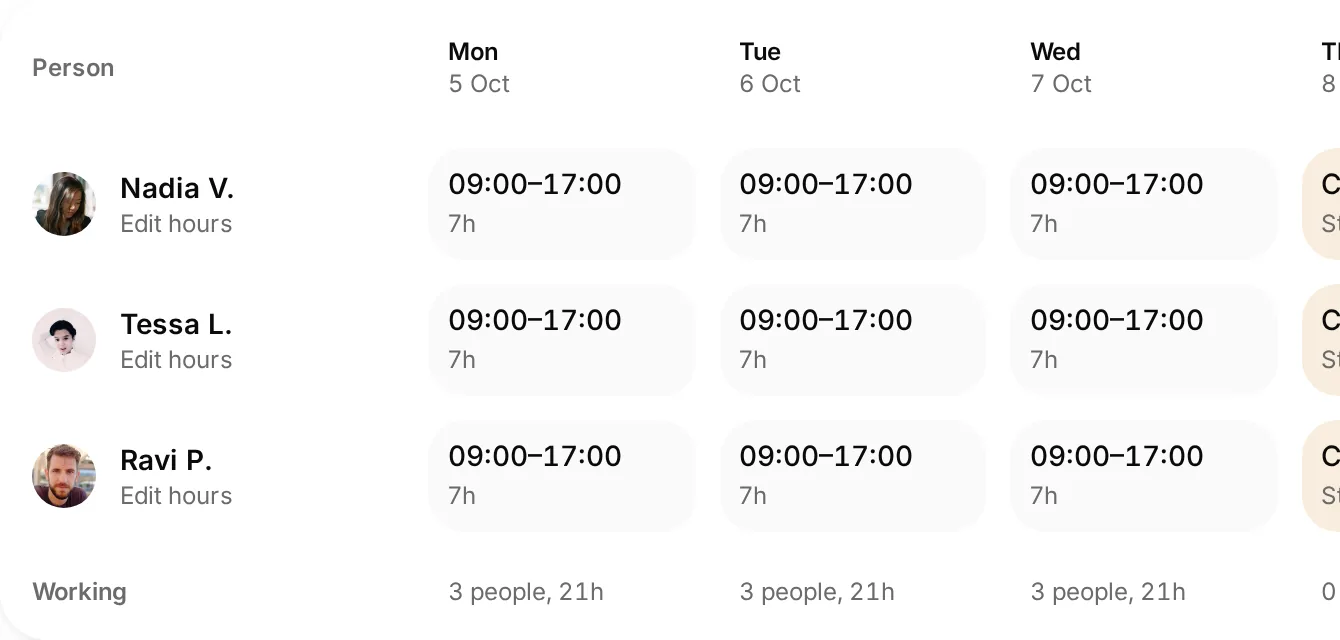
 Closures alongside working hours
Check the changed day
Review the week with regular patterns and closures in view.
See who is working, where they are needed and how the week fits together.
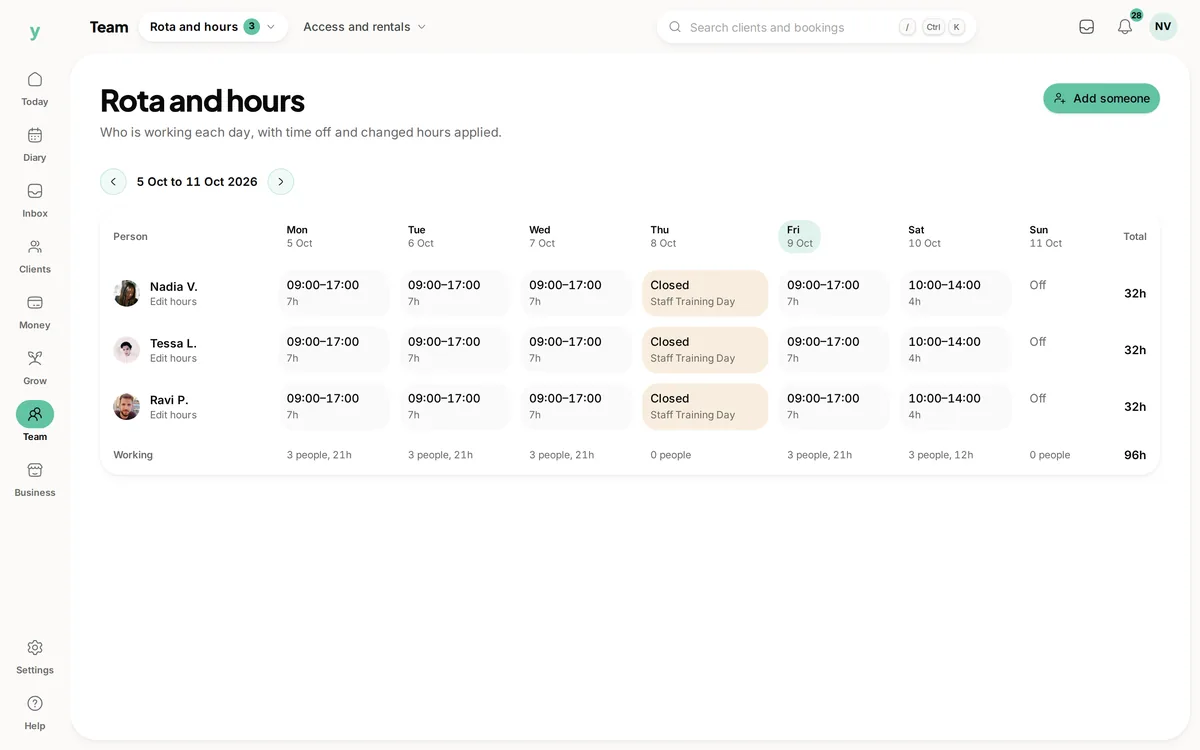
Real screens from The Cutting Room, our demo salon, with the numbers it shows today.
Closures alongside working hoursReview the week with regular patterns and closures in view.
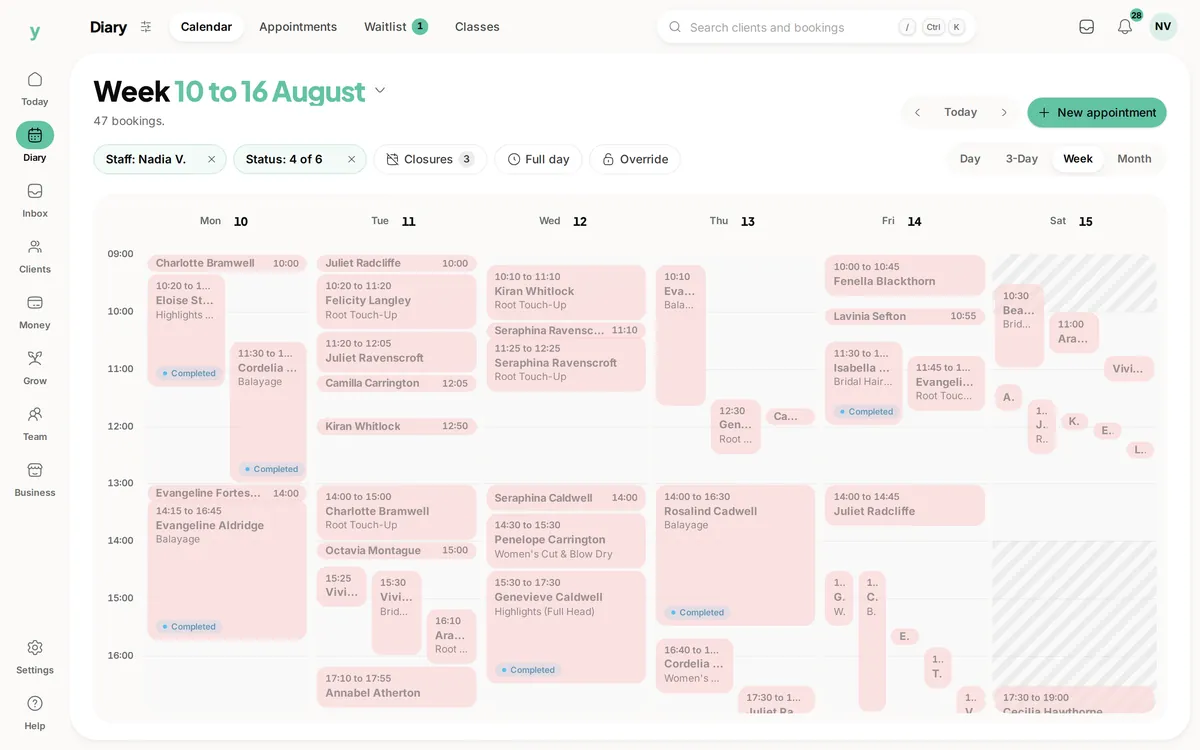 Check the bookings as well as the rota
Use the diary to see which part of a working week is already occupied.
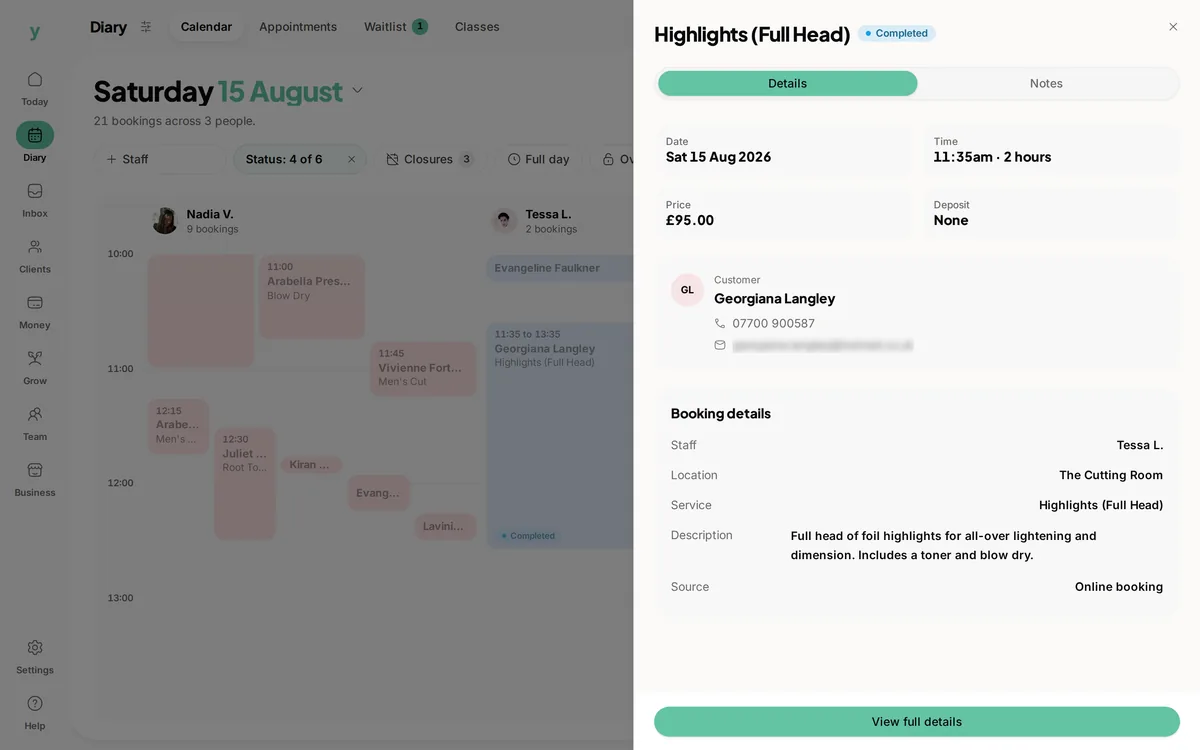 The booking behind the busy time
Open the appointment to check the service, time and person doing the work.
Before promising a customer a time, you need to know who is actually working. Youzse staff scheduling software brings regular hours, dated changes and business closures into a weekly rota. Use it alongside the booking diary to see the people available and the work already booked, without asking the team to keep two different versions of the week in their heads.
The rota shows the team for a selected week and location. Each person has their working days and hours in one row, making it easier to review a normal week before opening individual records. Move between weeks when planning cover rather than assuming next Tuesday follows the same pattern as this one.
Working hours and customer appointments answer different questions. The rota tells you when someone is scheduled to work. The diary tells you which bookings occupy that time. Review both when promising availability, particularly when a long service needs more than a short gap between appointments.
Staff availability holds the normal working pattern, with start and finish times and scheduled breaks. Keep that pattern accurate for the relevant location. If someone regularly finishes early on a Friday, recording that is more dependable than relying on a note at reception.
The rota also reads supported rotating patterns using the location's rotation setup. Check the anchor and the week being displayed when using alternating hours. A pattern that is correct on one week can still be wrong on the next if the rotation starts from the wrong point.
A changed day does not always mean the regular pattern has changed. Dated availability overrides allow a particular day to differ from the usual hours. Use the appropriate change for a late start, cover arrangement or absence, then review how that date appears in the weekly view.
Check the following week as well. A temporary change should not quietly become the new normal, and a permanent change should not depend on someone remembering to repeat a dated exception. Keep the reason clear enough that another authorised person can understand the arrangement.
| Situation | Record to review | Useful follow up |
|---|---|---|
| Someone changes their regular hours | Their normal availability pattern | Check the next few weeks and any affected bookings. |
| Someone starts later on one date | A dated availability change | Confirm the changed day and check that the normal pattern remains intact. |
| The whole location closes for training | The business closure for that date | Review existing appointments and what customers will be told. |
| A leave request is waiting for a decision | The leave status and applicable approval workflow | Distinguish pending information from an approved arrangement. |
| A customer asks about a long service | The rota and the booking diary | Check working hours, breaks and the time already occupied by other work. |
| A team member covers another site | The selected location and relevant staff hours | Review the dates and availability at each location. |
Leave and dated availability appear in the rota with the relevant status. Pending information needs a decision through the appropriate workflow; it should not be mistaken for an agreed arrangement. Review the request and approval state before telling a colleague their cover is settled.
Staff leave management depends on the plan. Check the current team options and permissions before relying on a leave approval process in your business. The rota is a useful view of recorded information, not a promise that a pending request has been approved automatically.
A training day, bank holiday arrangement or planned closure affects more than one person's hours. The weekly view includes business closures so the team can distinguish a closed day from a missing availability record. Keep the closure name useful to anyone checking the week.
A closure on the rota is not proof that every existing customer has been contacted or every affected booking resolved. Review the diary and the communication steps when changing a day that already has work in it. The schedule and the customer arrangements need to agree before the team relies on them.
Select the location before reviewing the team. Working patterns are attached to the place where the person is working, and the view follows the locations the signed-in user can access. Keep staff records and location assignments current when people move between sites.
Locations within one business share its data. A separate brand or business has its own subscription and records, even if you switch to it from the same login. Do not assume a rota in one business automatically combines the staffing of every other business you own.
Choose who maintains regular patterns and who deals with dated changes. When a colleague covers reception, they should be able to find the current week, select the location and see the arrangement without interpreting a private message sent several days earlier.
Use the staff roles and permissions that fit each person's work. Seeing a team view and changing someone else's availability are different responsibilities. Check the experience with the actual staff role during setup rather than assuming everyone sees the same options as the owner.
The weekly hours describe the schedule. They do not by themselves prove the hours someone actually worked or calculate what should appear in payroll. If your business needs payroll, clocking or specialist employment processes, review those requirements separately.
Garage Pro has mechanic time records for workshop work, which answer a different question from the staff rota. Keep planned attendance, productive job time and pay arrangements distinct when reviewing the week. A clear record is more useful than one total being asked to mean all three.
A salon customer asks for a colour appointment with their usual stylist on Friday. Start with the correct week and location, check the working hours and breaks, then review the bookings already in the diary. A person being at work does not mean the full service duration is free. Confirm the available time before offering it.
If a colleague has changed their hours for that Friday, make sure the dated change is reflected in the arrangement. Review any existing appointments that no longer fit. The useful outcome is a time the team can deliver, with the change recorded clearly enough for reception and the stylist to follow the same plan.
Review the access each person needs alongside their working hours.
The customer booking journey around staff and service availability.
Keep the team diary connected to customer records and billing.
Garage Pro assignments and recorded job progress alongside planned hours.
Check user allowances and the staff leave options for your setup.
The limits and the detail, answered before you spend an afternoon testing for them.
No. The rota shows working patterns, dated changes and closures. The diary shows bookings. Use both when reviewing availability or arranging cover.
We value your privacy
Cookies keep Youzse running, improve the platform and help deliver relevant content. Read our privacy policy and cookie policy.