
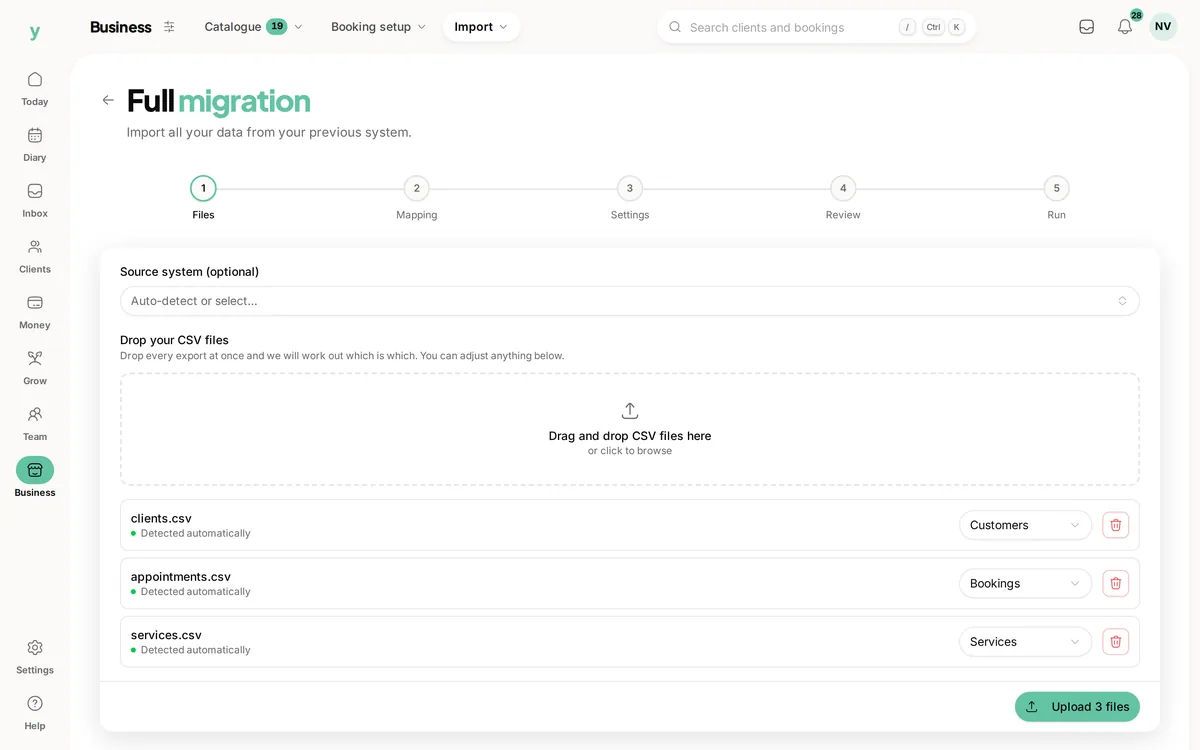
 Start with the supplied files
Choose the records to bring
Review the available exports and select the supported record types.
Bring the useful history with you, then check it is ready for the next working day.
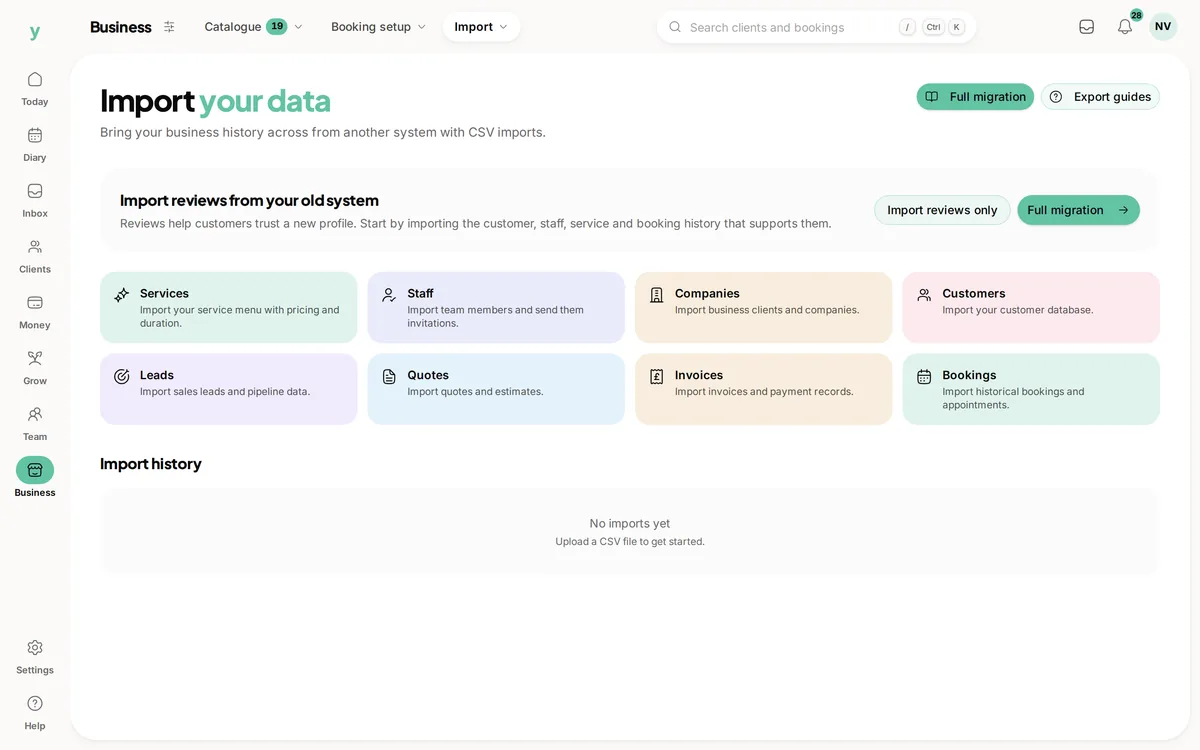
Real screens from The Cutting Room, our demo salon, with the numbers it shows today.
Start with the supplied filesReview the available exports and select the supported record types.
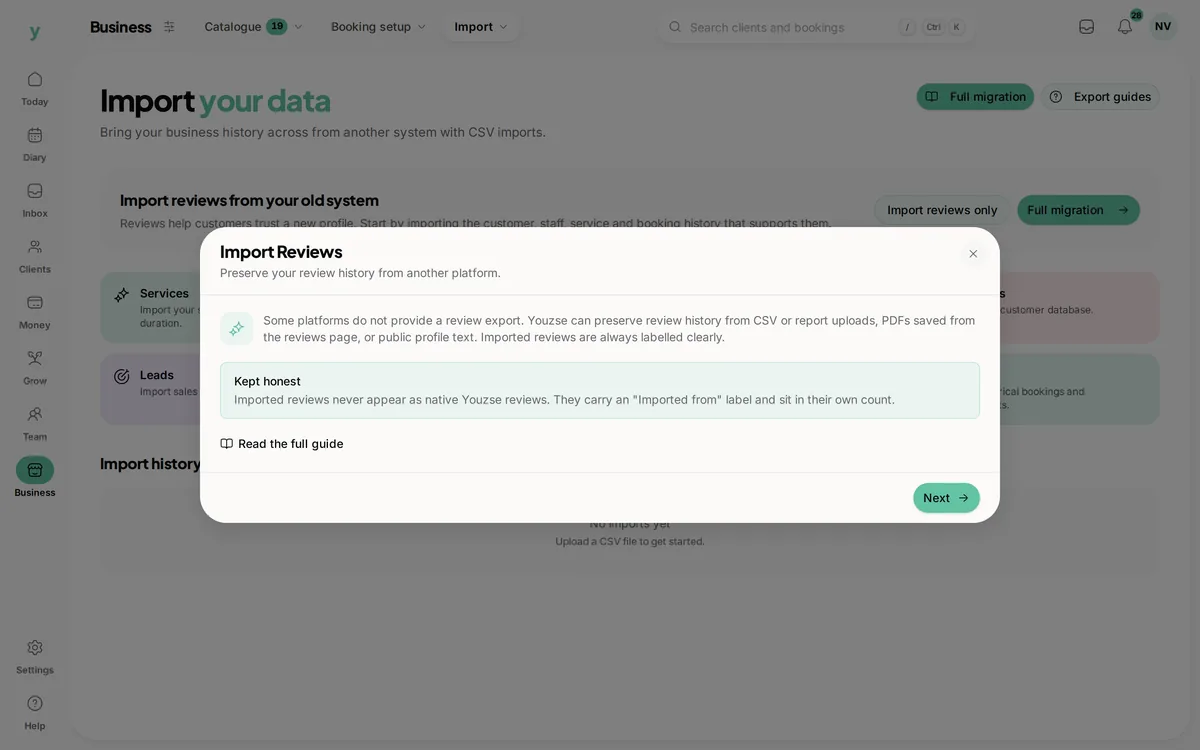 Older feedback keeps its origin
Review the supported review import without turning it into a native Youzse visit.
 Check the resulting customer record
Find the details the team needs for a useful customer conversation after the move.
Moving software should not mean starting every customer relationship again. Youzse customer data import helps you bring supported records into the business, map the available fields and review the result. Start with the export your current provider supplies, check the information you actually use and make the move with a clear view of what has arrived and what still needs attention.
List the information you need for the next conversation or booking. That may be customer contact details, service names, a company payer or appointments already arranged. Compare that list with the export from your current provider before assuming the file contains everything the team sees on screen.
Keep the original export so you can check a question later. A CSV is a set of supplied records, not a guarantee that every note, attachment or financial relationship is included. The available import depends on the record type, the fields supplied and the supported workflow.
Youzse has import routes for supported business record types, including customers, services, bookings, leads, quotes and invoices. Use the appropriate type for the file rather than treating every spreadsheet as a customer list. Available options follow the import permissions and business setup.
The broader migration workflow can deal with related records as a move, while a single import focuses on the selected record type. Review the route that fits the export you have. A familiar provider name is useful context, but it does not make every possible field or file from that provider automatically transferable.
The mapping step connects the source columns with the fields Youzse can use. Review suggested matches and the required fields. A column called name may contain a person, a company or a service, so checking the meaning matters more than accepting a similar-looking heading.
Pay particular attention to contact details, dates and money. A value that looks correct in a spreadsheet may have lost a leading zero or changed date format. Use the review information to check how the imported record will read, not just whether the file uploaded successfully.
| Record to try | Why it helps | What to review |
|---|---|---|
| A regular customer | There is history you recognise. | The name, contact details and relevant supplied information. |
| A company customer | The person and payer may differ. | Which record represents the organisation and which represents the contact. |
| An upcoming booking | The team will rely on it soon. | The date, time and any supported customer, service or staff association. |
| A quote or invoice | The document has financial context. | The supported references, amounts and relationships rather than just a headline total. |
| An exported review | Its source needs to remain clear. | The supplied wording and the separate imported origin. |
The import workflow includes duplicate handling and matching choices. Review those choices against the information in the file and the records already in the business. Two rows with similar names are not necessarily the same person, while a returning customer may already have a useful record you want to preserve.
Check the available matching fields before processing. If the export has changed contact details or contains shared company information, a simple name comparison may not describe the relationship correctly. Start with a small sample and inspect the result before relying on the same choices across a large file.
Uploading, mapping and processing are separate parts of the journey. The review step gives you a chance to inspect the supplied data and chosen mapping before the import is started. Use that pause to correct the source file or mapping if the information does not mean what you expected.
Review the source description and the information required about your right to use the data. Bringing a customer record across is not the same as obtaining new permission to send marketing. Keep the relevant communication choices part of the move rather than assuming an imported address is a fresh campaign audience.
Once processing begins, the import records progress and results such as created, updated, skipped and errored rows. Those categories help explain what happened to the file. A finished process does not necessarily mean every supplied row became a usable record.
Review errors before deciding what to retry. The error information identifies the row, field and message so you can check the source and the mapping. Avoid uploading the same file repeatedly without understanding the result, particularly if some of its records have already been created or updated.
A booking can depend on customer, service and staff records. A quote or invoice can also depend on the details behind its lines and customer relationship. Use the supported migration sequence when moving connected information rather than assuming separate files can be loaded in any order.
After the move, open the resulting records to check their relationships. Finding the customer in a list is useful, but the working test is whether you can find the appointment or document that belongs to them. Check the links the team will use on the next day, not just the total number of rows processed.
Supported review imports have their own workflow. Check what the previous provider lets you export and whether you have the right to reuse that feedback. Review the supplied comment and any available attribution before publishing it with the business.
Imported feedback stays distinct from a native Youzse review. It does not become a newly verified visit or create a live connection to an external review site. Review the dedicated review-management page for the reply and origin boundaries before planning how the team will handle the older feedback.
A salon moving its customer list might begin with a regular customer and an upcoming appointment. A trades business may choose a company customer and an accepted quote. Check the information you would normally need when that person calls, then have another authorised colleague find the same details.
Keep specialist records and anything absent from the export in your migration plan. Youzse cannot import information that was never supplied or promise to reconstruct every feature of the previous system. A clear list of what has moved and what remains elsewhere is more useful than a claim that switching needs no review.
Review the move from your current provider and the exports it can supply.
Use the imported customer history in the next working day.
Keep imported feedback separate from native reviews and their reply workflow.
Check the pipeline and responsibility behind imported opportunities.
The limits and the detail, answered before you spend an afternoon testing for them.
Supported exports can be imported through the available mapping and review workflows. What you can bring depends on the fields your previous provider supplies and the supported record types.
We value your privacy
Cookies keep Youzse running, improve the platform and help deliver relevant content. Read our privacy policy and cookie policy.