
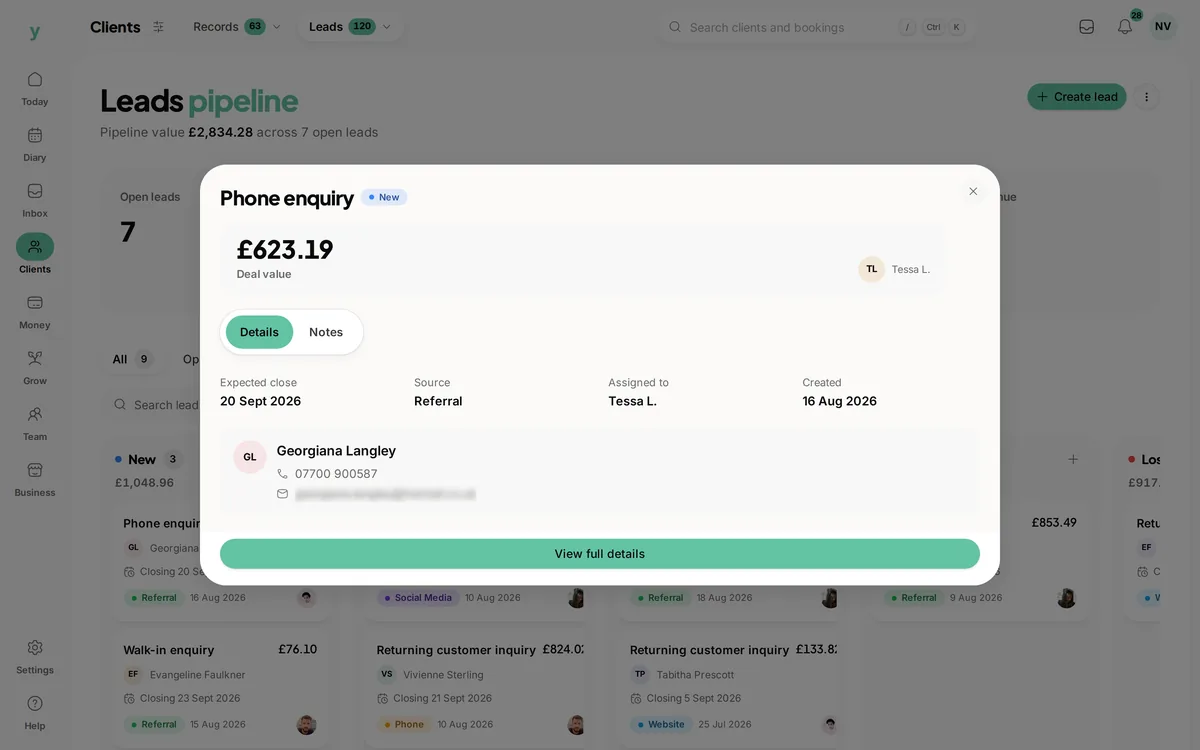
 The details behind the card
Know who is handling it
Review the lead owner, source and expected date before planning the next conversation.
See the opportunity, know who is handling it and keep the next conversation clear.
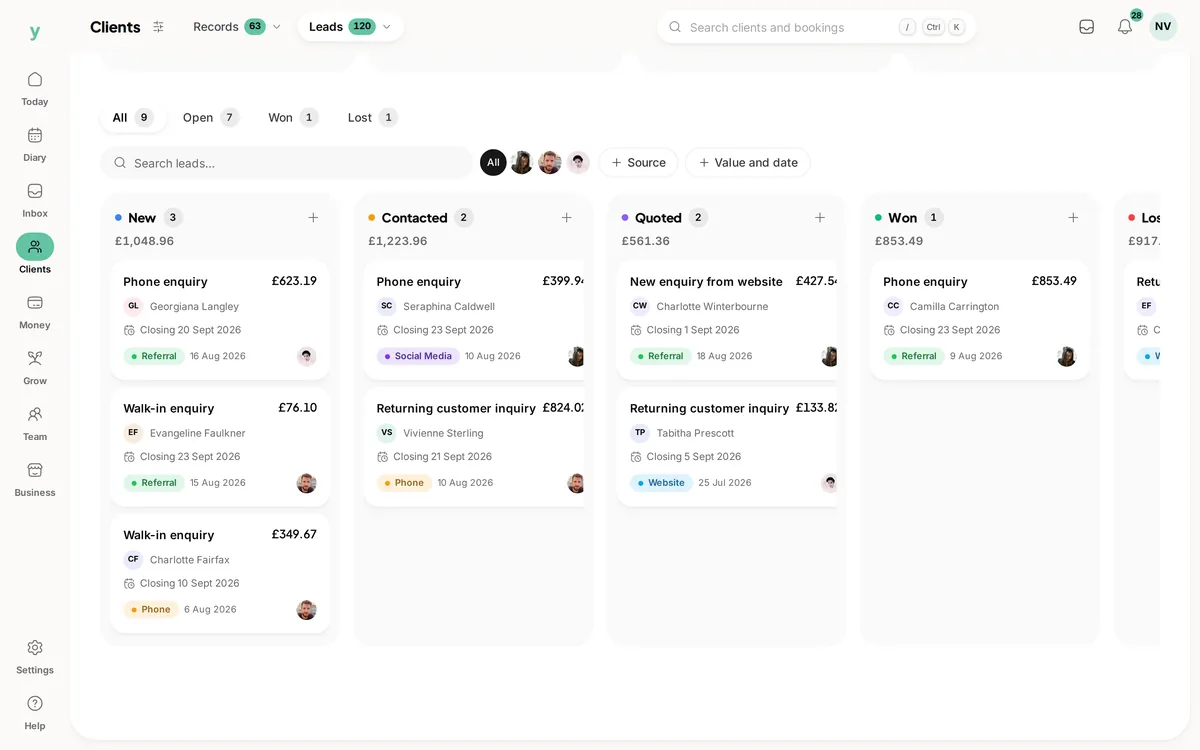
Real screens from The Cutting Room, our demo salon, with the numbers it shows today.
The details behind the cardReview the lead owner, source and expected date before planning the next conversation.
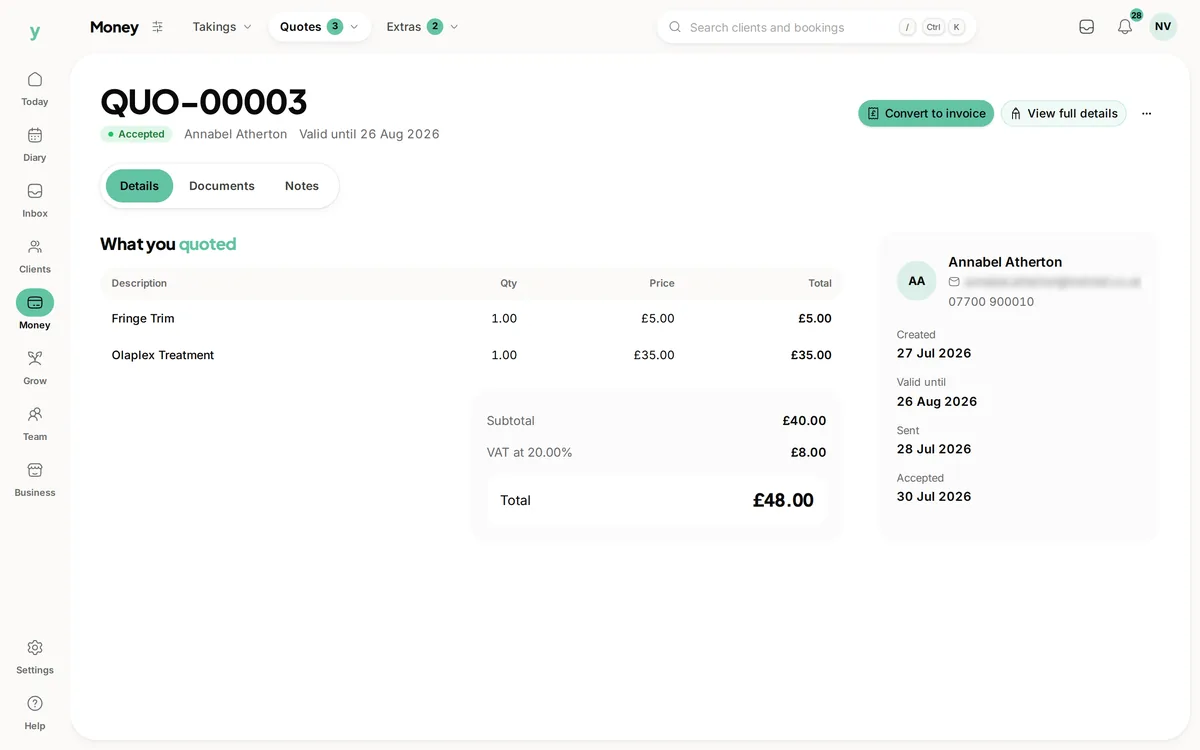 The proposal has its own record
Use the quote workflow when the scope is clear enough to price.
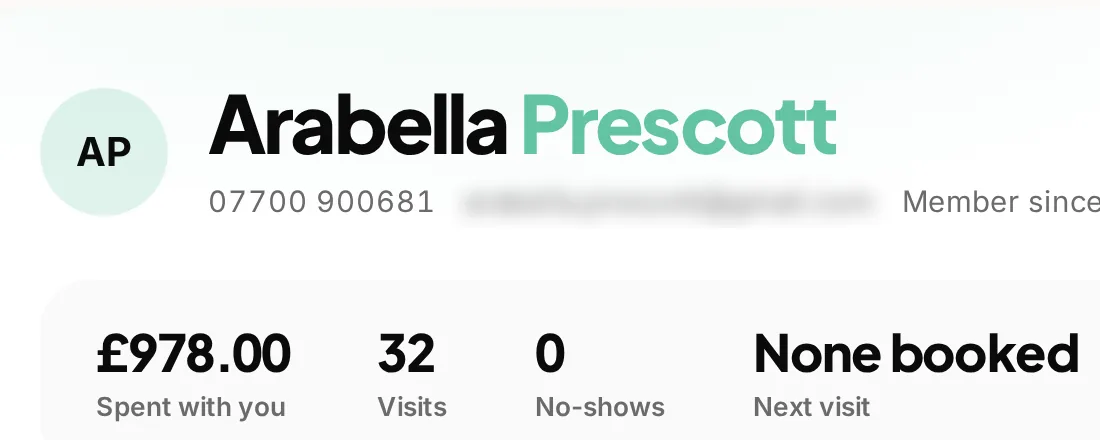 The wider customer relationship
Use customer history as context for the opportunity and its next step.
Drag a card into a stage or drop it above another card to change its order. You can also use the stage menu and Earlier or Later buttons.
Fictional example leads. Changes stay in this preview and reset when you leave the page.
Handled by Alex
Handled by Sam
Handled by Alex
Handled by Sam
Move an example lead here.
A promising enquiry does not always become a booking on the first call. Youzse lead management software gives that possible work a place to develop, with its customer, owner, stage and notes together. Use the pipeline to review the opportunities you are handling rather than relying on a collection of messages that only one person remembers.
Create a lead with a title that describes the possible work, then keep the relevant customer and enquiry context with it. Add the source and notes that will help with the next conversation. A record called kitchen lighting survey is easier to recognise than one labelled only new lead.
The enquiry inbox and the lead pipeline have different jobs. The inbox keeps the conversation; the lead records a possible piece of work you want to follow. Use a lead when that distinction helps, rather than turning every simple service question into another sales record.
The interactive leads board is available in all Youzse mobile apps too. Review the opportunity, update its stage and keep responsibility clear while you are away from your desk. Staff access still follows the permissions in your business setup.
The interactive Kanban board lets you drag a lead into another stage and place it in the order you want. Reorder cards within a column to arrange the next conversations, or move a card across columns when the opportunity progresses. The saved position keeps the board in the order the team has chosen.
A stage change and a change of order describe different things. Putting a card first in its existing column helps organise the work without pretending the opportunity has reached a new stage. Moving it to another stage records that progress. Keep the notes and assigned person current so the board remains useful to a colleague covering the pipeline.
The pipeline groups leads into ordered stages. Move a lead when the work reaches the relevant step, and review the notes before contacting the customer again. The purpose is to make the current situation visible to the team, not to give every conversation a complicated process.
Keep stage names clear enough for someone covering the work to understand them. A possible job waiting for details is different from one where a decision is expected. The recorded stage should describe what is known, not an optimistic guess about what the customer might do next.
| Detail | What it helps answer | What it does not prove |
|---|---|---|
| Assigned staff member | Who is handling this opportunity? | That the next conversation has already happened. |
| Pipeline stage | Where has the discussion reached? | That a customer has accepted work or booked a date. |
| Recorded value | What is the estimated size of the opportunity? | That the business has received that money. |
| Expected closing date | When should we review the decision? | A guaranteed date for acceptance or payment. |
| Source | How did the opportunity reach the business? | That the source caused every later booking. |
| Won or lost status | How did the recorded opportunity end? | That every related quote, booking or invoice is settled. |
Assign the lead to the staff member dealing with it and update that assignment when responsibility changes. The next person opening the board should be able to see who owns the conversation without asking around or searching through a separate message thread.
Use the notes to record the useful outcome of a conversation. Explain what the customer asked for, what remains uncertain and what was agreed as the next step. A note that only says called is less useful to a colleague than a short account of the information still needed.
The lead value helps the team understand the scale of potential work. It is not an invoice, payment or confirmed forecast. Review how the estimate was reached and update it when the scope changes, so the pipeline does not keep presenting an old figure as the current opportunity.
Keep the expected closing date realistic and review it when the customer needs more time. A date on the board can prompt a useful review, but it should not turn an unfinished discussion into a promise that the business will have the work by Friday.
A homeowner asks an electrician about lighting for a kitchen renovation. The initial conversation needs a site visit before the work can be priced. Create the lead with the customer, source and person handling it, then record what the visit needs to establish.
After the visit, update the stage and notes to reflect what is known. Prepare the quote through the appropriate quoting workflow when the scope is clear. Keep the lead and its outcome understandable without assuming that moving its card has created a quote or reserved the installation dates.
A colleague may need to answer a customer while the lead owner is on another job. The customer association, notes and recorded stage provide a starting point. Check what has actually been agreed before offering a price, date or commitment on someone else's behalf.
Staff access still follows the business permissions. Give the people handling leads the access they need and try the workflow using their actual role. A board that is clear to the owner should also be understandable to the authorised person who covers the next call.
Youzse records open, won and lost lead states through its pipeline workflow. Use the appropriate outcome when the opportunity ends rather than leaving an old discussion open indefinitely. When work is lost, keep a useful reason where available so the record has context if the customer returns later.
Winning an opportunity and collecting payment are different events. Check the quote, booking and invoice through their own workflows. A lead marked won should help explain the outcome of the conversation, not stand in for every record needed to deliver and bill the work.
Start with a manageable set of real opportunities. Review the owner, stage, value and expected date, then decide which conversations need attention. Close or update old records so the board remains useful to someone planning the week rather than becoming a history of every request the business ever received.
Keep your review focused on decisions the team can make. Who needs a quote? What information is missing? Which customer is waiting for a reply? Lead software gives those questions a shared record, but the business still chooses the right follow up and whether it can deliver the proposed work.
Customer records, enquiry conversations and quoting tools sit alongside the pipeline in Youzse. Use the relevant records as the opportunity develops so the next person can find the context. Avoid copying an old estimate into several places and leaving the team unsure which figure was finally agreed.
If you are moving an existing lead list, review the supported import fields and the matching customer records. Check the imported stages, owners and values rather than assuming a successful upload means the old pipeline has been recreated exactly. A short sample is a useful way to test the handover.
Check the access behind the team handover.
The first conversation before an opportunity needs a pipeline record.
Prepare the proposed work and follow an accepted quote into billing.
Keep the customer relationship alongside the opportunity.
Review the source fields and relationships when moving an existing lead list.
The limits and the detail, answered before you spend an afternoon testing for them.
Yes. Drag a lead between stages or reorder cards within the same stage. The application saves the stage and position. Moving a card does not send a quote, book the work or record a customer payment.
We value your privacy
Cookies keep Youzse running, improve the platform and help deliver relevant content. Read our privacy policy and cookie policy.